
I’ve been doing SEO for over a decade, and I’ve tested and used almost all the tools on this list on my own sites—not just reading their sales pages for copy and paste.
For this update, I spent over two months retesting all 18 tools across five criteria that matter most when choosing SEO software that makes a bigger impact on your business.
Key Features: Does the tool do what it claimed, like keyword research, backlink analysis, content optimization, AI visibility, site audit, etc.?
Ease of use: Is the interface user-friendly? And how long does it take before a beginner gets useful output?
Pricing vs. value: Does the value justify the price? Does the entry-level plan offer value or just the headline price?
Data accuracy: How close are results when compared to the Google Search Console?
Reliability: Does the tool work as advertised, or does the dashboard lack navigation?
24/7 Support: Support is very crucial and tells you more about the tool.
Note: No tool is universally the best. All of them have their own drawbacks.
No AI-generated content, but real insight from me based on my personal experience with some of these tools.
Disclaimer: I use affiliate links for some of these tools, but that doesn’t change my rating and recommendation.
What Is an SEO Tool?
An SEO (Search Engine Optimization) tool is software designed to help you improve your website’s visibility on search engines by analyzing, optimizing, and tracking performance.
It isn’t limited to Google alone. This includes Bing and AI tools such as ChatGPT, Copilot, Perplexity, and other search engines available today.
Learn more about how to get cited by AI models to grow your customer base faster and beat your competitors.
These tools perform different tasks like keyword research, competitor analysis, backlink checking, etc.
Many of them help you optimize your content for search engines, while others help you with the technical SEO of your website.
Many of the SEO tools I listed can do all that I mentioned, while some are designed for a specific task.
So this is a comprehensive review of the best SEO tools on the market.
What Do I Consider the Best SEO Tools?
The best SEO tools to consider using as a beginner are Google’s free tools that offer all the features you need for your SEO.
This includes Google Keyword Planner, Google Autocomplete, Google Related Keywords, Google Trends, and Google Search Console.
Google SEO tools are the best free SEO tools you should start to use. I’ll go over each of them later.
For content creation, some of the top-rated tools are Keysearch, Claude, and Surfer.
When it comes to keyword research, competitor analysis, and backlink checkers, tools like Ahrefs, Semrush, and Ubersuggest lead the way.
For creating SEO automation, one tool I love to use is Gumloop. It offers the best compared to other automation software in the market.
Great, without further ado, let’s go into the list of tools.
Comparison Table of the Best SEO Tools in 2026
| Tool | Best For | Pricing | Free Plan | My Rating |
| Semrush | All-in-one SEO + GEO + AI visibility | $199/mo | 14-day free trial | 4.6/5 |
| Keysearch | Affordable keyword research tool | $24/mo | 7-day Free trial | 4.4/5 |
| Ubersuggest | Beginners, lifetime pricing | $12/month | Free with limited features | 4.4/5 |
| Ahrefs | Keyword, backlink, & competitor analysis | $129/month | No free plan | 4.6/5 |
| Surfer SEO | Content optimization | $99/mo ($79 annual) | No free plan | 4.5/5 |
| SE Ranking | AI SEO for Agencies & local business | $52/mo | 14-day Free trial | 4.6/5 |
| Mongolis | Beginner-friendly all-in-one | $18/mo | Free plan | 4.3/5 |
| Answer The Public | Question-based keyword tool | Free tier available | Includes Free Account | 4/5/5 |
| Google Search Console | First-party performance data | Free | Free | 4.9/5 |
| Google Keyword Planner | Keyword tool with the most accurate search volume | Free | Free | 4.6/5 |
| Screaming Frog | Technical SEO audits | $249/month | Free for 500 URLs | 4.6/5 |
| Similarweb | Traffic & market intelligence analysis | $125/month | Free but limited | 4/5/5 |
| Clearscope | AI SEO, AI visibility, content scoring | $129/mo | No free plan | 4.2/5 |
| SEOptimizer | White-label SEO audits tool | $29/mo | Free single audit | 4/5 |
18 Best SEO Tools I Have Personally Tested That Are Worth It.
Here are the best SEO tools in 2026.
2. SemRush
Category: All-in-one SEO tool
Best for: Beginners and experienced
Ease of use: Friendly user interface and easy to navigate
Pricing: Starts at $119 per month
Semrush is a big player when it comes to SEO and keyword research tools.
I have been using Semrush for years and am still using it. When looking for a tool that combines SEO and marketing tools, think about the Semrush platform.
The Semrush team acquired the Backlinko SEO website a few years ago, and it has been a plus for them.
How SemRush Works
Semrush is more than just an SEO tool; it is a toolkit that makes my brand stand out. It goes from traditional SEO to GEO and AI discovery.
What I like about the Semrush tool is the ease of identifying profitable keywords that rank fast on Google and other search engines.
Here are a few outstanding Semrush features:
Traffic and Market
Analyze traffic of any website, track competitors, and gain audience data to improve your SEO and optimize your content for better ranking.
SEO Tools: Find keywords with their metrics, using AI insight to uncover more low-competition keywords that drive targeted traffic to your pages.
Analyze the backlink and traffic potential of your competitors’ websites to give you a clue about how to outrank them.
With a click, you can run technical audits and track the ranking of your websites.
I added my website to the SemRush tool, so I can check its performance, keyword ranking, and how to audit my site for more visibility and traffic.
Local SEO: Are you a local SEO expert? You will find this feature useful. Optimize your Google Business Profile and get your business listed on directories without spending hours.
Content Marketing
Launch SEO content that is optimized using AI to improve ranking and meet search intent metrics. Find content ideas for your next blog posts. Not only that, but the SemRush content also provides a real-time score to see if the content meets first-page rank metrics.
Semrush AI visibility: Quickly analyze how LLMs feature your brand. We’re in the era of AI, and my blogs are getting more traffic from AI engines, mostly ChatGPT.
You can track your competitors’ AI visibility to get ideas to improve your content. Access to AI tips to improve your strategies so that your brand can get ahead on LLM engines.
Advertising
Want to gain more traffic using ads? This feature helps you to launch AI-powered Google and Meta ads with ROI.
I have not really used this feature, but if your business requires advertising, take advantage of it.
Optimize your PPC campaign and uncover competitors’ ad strategies you can implement in your ad campaign to improve your ad campaign’s ROI.
AI PR
Prefer using media to grow your website or client sites? AI PR is a game-changer to help you launch an outreach campaign in minutes.
Find media trusted by LLMs and monitor your brand presence without spending thousands of dollars.
Social
Using social media to drive more traffic and expand your website visibility is a must if you want to scale your business.
Easily create and schedule posts with AI, monitor your brand mentions, and find the relevant influencers for your brand.
There are more advanced features you can get if you choose SemRush as your SEO tool to automate SEO and content and optimize for AI search.
Who Is SemRush For?
SemRush is a great platform for startups, marketing agencies, local businesses, and enterprises that need a complete SEO toolkit to win search visibility.
Pricing Plans
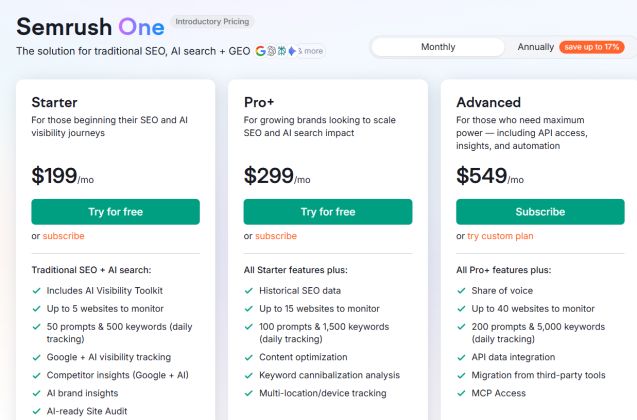
Here are the SemRush pricing plans and breakdown.
The Semrush One starter plan costs $199 per month
The starter plan costs $199 per month, and it comes with AI visibility, a toolkit, monitoring for up to 5 sites, 50 prompts and 500 keywords, and AI tracking.
Keyword research, competitor insight, AI brand insight, and much more.
Pro+ plan: The Pro+ plan costs $299 per month; the plan is for experienced SEO professionals who have a team.
It includes all starter features, plus:
Historical SEO data, monitoring up to 15 sites, 100 prompts, and 1,500 keywords daily. Content optimization feature, keyword cannibalization analysis, and multi-location tracking.
Advanced Plan: The advanced plan includes all Pro+ features plus:
Up to 40 sites to monitor, 299 prompts, and 5,000 keywords daily; tracking data integrations, MCP access, and easy migration from third-party tools.
You can check the SemRush SEO tool review to learn more and compare each plan.
Pros and Cons
Pros
- All-in-one SEO toolkits. A platform that caters to all SEO and marketing research to improve your website and brand visibility.
- Access to a tutorial and guide to master how the tool works and easily explore its features and apply them to your SEO strategies.
- Manage all your SEO, AI, and MLLs in one platform without a third-party tool.
Cons
- Expensive for beginners in SEO and those who are on a low budget.
- The interface is not user-friendly like KeySearch, but still easy to navigate when using it.
- It requires a learning curve to understand each feature and how to use it.
SemRush Rating and Reviews
Let’s take a closer look at its rating across the net from its real users.
- G2: It has a 4.5 out of 5-star rating from real SEMrush users.
- On Capterra, it has a 4.6 out of 5-star rating
You can read more related posts on Semrush:
2. KeySearch
Best SEO tool for beginners
Category: Keyword Research tool
Best for: Budget-friendly SEO tool
Ease of use: Great for beginners and experienced users
Pricing: Starts from $20/month or $24/month (billed annually)
KeySearch is one of my favorite keyword research tools that has helped me in my SEO to grow by blog traffic.
If I’m to recommend the best budget-friendly SEO tool for bloggers and marketers who need a tool for keyword research, competitor analysis, and content optimization, KeySearch is my go-to.
When compared to other tools like Ahrefs, KeySearch is the winner when it comes to the cost per month.
Though Ahrefs has more advanced features, KeySearch is still the best for beginners, as it is more affordable.
How Keysearch Works
The Keysearch SEO tool is the most affordable, and it performs well, unlike other expensive tools in the market.
I found the Keysearch tool easy to use, and its features are amazing compared to the rest.
Keyword Research
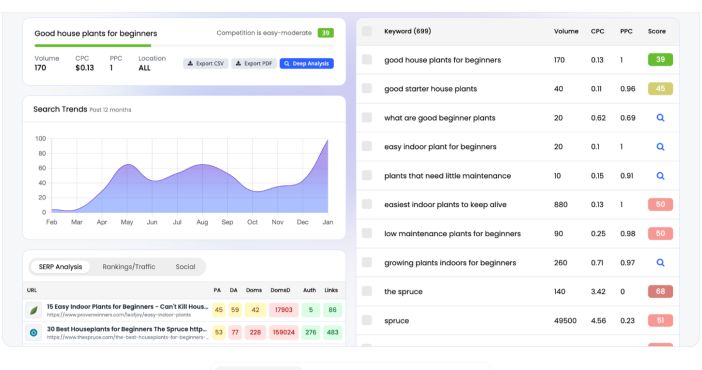
I found Keysearch keyword research very easy to use, and I have uncovered many low-competition long-tail keywords that are easy to rank on search engines.
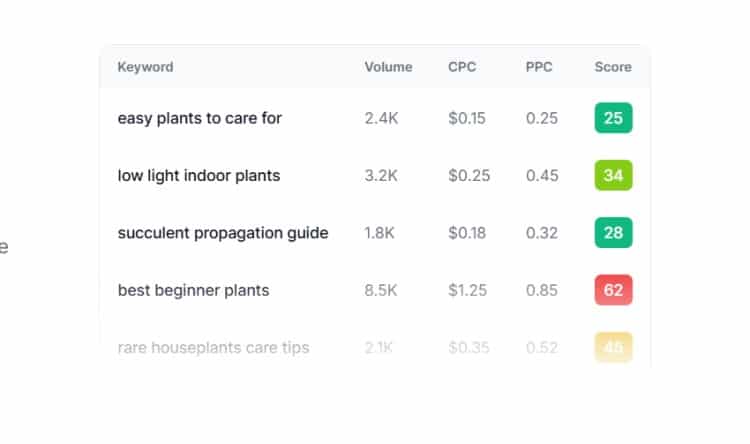
What I like most when using KeySearch is that it shows more metrics so that I can filter the keywords.
Competitors’ Analysis
Just like Ahrefs, I perform competitor analysis to find out what keywords my competitors are ranking for and where they got backlinks and traffic.
AI-Power Editor
I love the Keysearch Power Editor to optimise my content for SEO and see what keywords my competitors are ranking for, what they include in their content, etc.
Rank Tracking: Track the performance of a website and see how it ranks over time.
SEO Audit: The audit feature provides details about my website and any technical SEO issues so that I can fix them to improve ranking.
SERP Analysis: Learn what it takes to rank sites on page one by analyzing search results.
Long Tail Keywords: Quickly identify low-competition keywords that can drive targeted traffic with little optimization.
I can also use the tool for YouTube keyword analysis to uncover keywords that generate more traffic from YouTube.
Who Is Keysearch For?
Keysearch is perfect for anyone just starting to use the SEO keywords tool to gain visibility and drive traffic to their website.
It’s great for beginners because it’s affordable and has a user-friendly interface. Perfect for long-tail keyword research, analyzing competitors, and auditing any website to fix SEO issues.
Read the complete Keysearch SEO tool review to learn more about the platform.
KeySearch Pricing
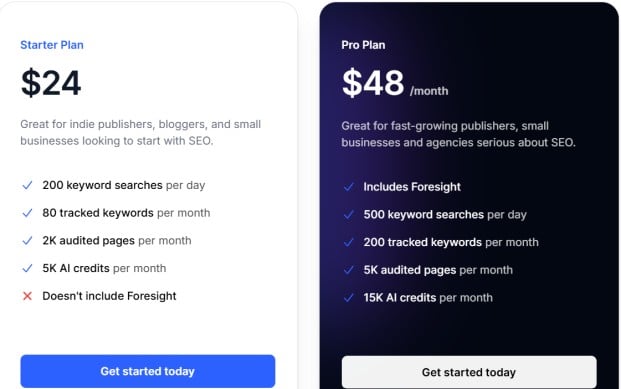
KeySearch has two main pricing plans:
Starter plan: It costs $24 per month with full features to grow your traffic.
It comes with 200 keyword searches per day, 80 tracked keywords per month, 2k pages to audit per month, and 5k AI credits per month.
Pro Plan: The Pro Plan costs $48 per month and comes with all the features.
500 keyword searches per day, 200 tracked keywords per month, 5k audited pages, and 5k AI credits per month.
You can read the keysearch pricing review to learn more about its cost.
Pros and Cons of KeySearch
Pros
- What I like most is the clear pricing breakdown
- The basic plan offers everything you need in an SEO tool. This is the plan I subscribe to when using the tool.
- You get access to keyword research, competitor analysis, website audits, SERP analysis, etc.
- Easy to use and user-friendly interface
- It is the most affordable keyword tool available online at the moment.
Cons
- Customer support may take time to respond
- The tool is slow at times before bringing out its results, requiring a few minutes to wait.
- Lack of an AI visibility tool to track which AI models are citing my site
- No deep competitor analysis insights like Semrush and Ahrefs
KeySearch rating and review
Let’s take a look at its rating and reviews from real users.
The tool has a good rating, and reviews are positive from real users.
The overall performance of KeySearch is excellent for the value it offers. It’s worth every penny.
Did I mention you can start with a free trial to test the tool before a paid plan?
Yes, start the KeySearch free trial now. If you’re looking for the best affordable SEO tool, try KeySearch.
KeySearch vs Ahrefs
Both search engine optimization tools offer the most important features; KeySearch is more affordable in terms of cost. Ahrefs has advanced features you can’t find in KeySearch, like an AI visibility tool to know which AI model is citing your brand.
Here is a complete comparison of Semrush vs KeySearch to see which tool wins.
3. Ubersuggest
Category: SEO, AI, and keyword tool
Best for: Anyone looking for an SEO and keyword tool
Ease of Use: Beginners and experienced users
Pricing: Starts at $12 per month or $120 for a lifetime
Ubersuggest is not new in the world of keyword research tools. Owned by one of the SEO experts of our time, Neil Patel.
Neil Patel is a renowned SEO and marketing expert who has helped countless people understand SEO and marketing.
I joined the Ubersuggest tool some years back, and I’m still using it today. In fact, it is my go-to tool when it comes to analyzing competitor backlinks.
How Ubersuggest Works
From keyword research to AI visibility and site audits, Ubersuggest offers advanced features to improve your SEO and increase brand awareness.
Ubersuggest Keyword Research tool is a great place to start and identify more keyword ideas.
It goes beyond just a keyword tool; the team has introduced AI keyword overview, bulk analysis, keyword ideas, and keyword visualization.
I love the AI prompt ideas for anyone who doesn’t know how to use AI to perform keyword research or use it in general.
Want to analyze your competitors’ website traffic, top pages by traffic, similar websites, backlinks, etc.? The competitive research feature makes it a breeze.
I use the backlink tool most of the time to discover how and where my competitors are getting backlinks.
It reveals all the sites linked to my competitors’ websites, so I can work on or reach out to gain more links.
Not only that, I can track my ranking and see which keywords move up and which drop in search engines.
Other tools you will get with Ubersuggest are an AI writer, a Chrome extension, and content ideas.
As an SEO expert, you get all the tools to perform keyword research, analyse your competitors, gain AI search visibility, and much more.
Who Is Ubersuggest For?
It is best for beginners starting SEO and who want an easy-to-use tool to get started.
Small businesses with an affordable budget.
Anyone looking for keyword research and content ideas to grow their website traffic.
Ubersuggest Pricing Plans
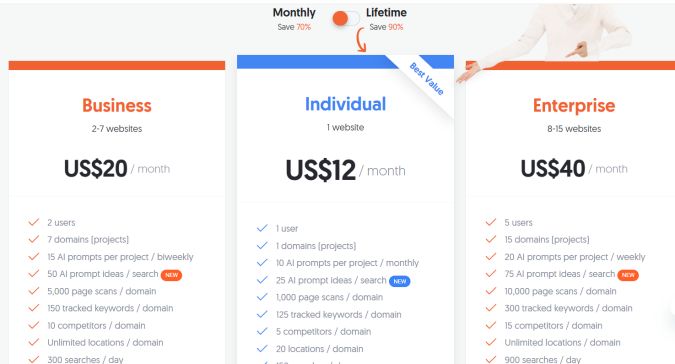
It has three pricing plans for monthly or lifetime payment.
Like me, I subscribed to the lifetime payment and am still enjoying the tool to this day. So, I encourage you to choose a lifetime plan and save a lot of money.
Individual Plan: It costs $12 per month and $120 for a lifetime.
This plan comes with 1 user, 1 domain, AI prompts, 10 AI prompt ideas, 123 tracked keywords per domain, 5 competitor domains, AI responses, etc.
Business Plan: The plan costs $20 per month or $200 for a lifetime.
It comes with 2 users, 7 domains, AI prompt ideas, 5,000 pages scanned, 300 searches per day, 200 keywords to analyse at a time, and much more.
Enterprises: The enterprise plan costs $40 per month and $400 for a lifetime.
Up to 5 uses, 15 domains, 20 AI prompts, 10,000 page scans, 300 tracked keywords, 15 competitor domains, 900 searches per day, and more.
You can check the Ubersuggest pricing page to learn more.
Pros and Cons
Pros
- User-friendly: Simple user interface for beginners.
- Affordable: Cheaper compared to other keyword tools, and the lifetime purchase option.
- Core SEO features: Comes with essential features such as keyword tools, backlink analysis, AI visibility, content ideas, etc.
- Chrome extension: Free Chrome extension to get metrics from Google results.
Cons
- Data not accurate at the time, which differs from other tools like SemRush, Keysearch
- Limited features on the free version: The free version has limited features.
Ubersuggest Rating and Review from Real Users
- G2: It has a 4.3 out of 5-star rating
- Capterra: It has a 4.4 out of 5-star rating
4. Ahrefs
Category: Keyword research and backlink analysis
Best for: Keyword research and competitor analysis
Pricing: Starts at $129 per month
Ease of Use: Beginner and experienced
If you’re not new to the SEO world, you probably have heard about Ahrefs, a complete SEO tool for bloggers and marketers.
Ahrefs is transitioning into a marketing platform for search engines and LLMs.
What are the Ahrefs features?
I have used the tool for my SEO, and it is one of the best tools to use with great performance.
Search Marketing
Ahrefs is a powerful search marketing tool to analyze competitors, track rankings, and discover ranking opportunities to optimise your website.
Site Explorer: Provides an in-depth organic site traffic, paid traffic, and backlink profile of your competitors.
It provides insight into competitors’ websites and overall performance.
Keyword Explore: Find evergreen topics and find low-ranking keywords with their metrics. Easily filter keywords to meet your metrics.
Rank Tracker: Track keyword ranking, get reports, and find out which keywords to include in your content.
Content Gap: Identify keywords your competitors are ranking for, identify untapped keyword opportunities, and much more.
Monitor brand mentions in AI and find key AI content gaps. I can also find websites that link to my competitors to attract more links to my website.
Website Performance
You can know how my website is performing against competitors through audits and monitors to improve my website’s SEO health, speed, and technical performance to gain more rankings.
The Ahrefs Site Audit helps users to audit their websites to know if there are any SEO issues and what to do to fix them.
The website analytics features provide insight into website traffic. Track key metrics like visitors, bounce rate, and LLM chatbots.
The SEO toolbar provides insight about any website I visit, helping me get valuable data to help my SEO strategies.
Content Marketing
Research and create SEO content that is easy to optimize with Ahrefs tools to drive more traffic to your site and grow your audience.
With Content Explorer, I can discover brand mentions and link opportunities filtered by SEO and metrics.
For those who love using AI content, the AI content helper creates high-quality and SEO-optimized content that can rank faster on search engines.
After creating content, the AI content grader will compare your article with top-ranking pages and provide suggestions to improve your content
Who is Ahrefs for?
Ahrefs is great for beginners and experienced bloggers and marketers who want the best SEO tool.
It’s perfect for freelancers who perform SEO audits, keyword research, etc for their clients.
Not only that, but it also works for anyone or companies who combine SEO and content marketing to grow their business.
Pricing Plans
Let’s talk about its pricing and find out if it is affordable for any business.
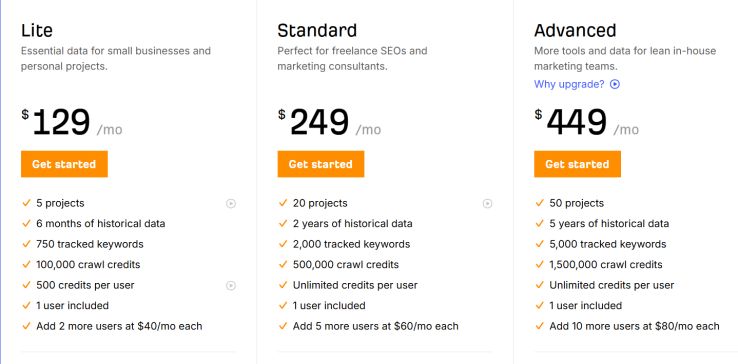
It has three pricing plans as follows:
Lite: The Lite starts at $129 per month, and it comes with 3 projects, 6 months of data, 1 user, 100,000 crawl credits, and 500 credits per user.
Standard: It costs $249 per month. It comes with 20 projects, 3 years of historical data, 2,000 tracked keywords, 500,000 crawl credits, and unlimited credits per user.
Enterprises: The enterprise plan costs $1,499 per month. This plan is perfect for the SEO team. It comes with all advanced features.
The Starter Plan: This plan costs $129 per month and is good for beginners who need keyword research and to spy on their competitors.
Ahrefs AI Visibility Tool
Just like Semrush, Ahrefs has introduced AI visibility features to track prompts, identify which AI models cited your site, and view your brand.
If you want to stay ahead of your competitors, your brand AI visibility is very crucial, as searches are changing toward question queries.
Pros and Cons
Pros
- All-in-one content marketing and SEO tools
- Integrates with AI search engines like ChatGPT, Gemini, Perplexity, etc.
- Ease of use for both beginners and experienced SEO users.
- Offers free training and tutorials to master how the tool works.
Cons
- High cost: Ahrefs is very pricey, and many people have complained about it in some SEO groups and communities.
- The rank tracking is not 100 percent accurate, though it is very close in most cases when I compare it with other tools.
Ahrefs rating and review by users
Here are ratings and reviews of Ahrefs on review sites.
- Capaterra: 4.7 out of 5 stars rating from
- G2: 4.5 out of 5 stars from the
Overall, Ahrefs is one of the best tools for SEO, and you can check it yourself. It’s worth it.
5. Surfer SEO
Category: SEO and content optimisation
Best for: Writing and optimising SEO content
Ease of use: Beginners and experienced users
Pricing: Starts at $99 per month
Surfer started as a content optimization tool for bloggers and marketers to optimize their content to meet the top 10 rankings.
But now, Surfer has gone beyond just SEO content optimization; it is now an SEO tool to boost visibility in search engines, ChatGPT, and other AI engines.
And according to the Surfer SEO tool, it offers you workflows to make sure your content is visible to Google, ChatGPT, and the rest.
How Surfer Works
One main core of Surfer is to help users optimise their content to improve ranking by checking the top 10 results and recommending actions to compete with the top 10 pages.
Optimise with a simple workflow and increase your website visibility in Google and AI platforms.
What I like most about Surfer is that it provides in-depth metrics on the top 10 rankings and makes it easy to re-optimize all your content to improve your ranking.
Insert internal links automatically by scanning your site for relevant pages to enhance internal linking, a key Google ranking factor.
If you’re a blogger who outsources content on marketplaces like Fiverr or Upwork, you know it is very crucial to check your content using the best AI content detector.
Surfer offers an AI content detector to check your content and ensure it passes AI content.
I love using this feature when I outsource my content. But to make it clear, it is not 100% accurate.
Google and other search engines don’t want complete content written with AI, so always take advantage of this feature.
And to simplify your content workflow, the Surfer SEO tool provides features that allow you to humanise AI-written content.
I am not 100% sure if Google can detect whether content is humanised. Whether using AI or not, my advice for you is to stay away from publishing AI content.
Surfer All-in-One SEO Suite covers all aspects of SEO, from creating ready-to-rank content to inserting relevant internal links and boosting content score.
It helps you to publish unique content that resonates with your audience and avoid grammatical errors using a built-in plagiarism checker tool.
Surfer provides a tool that helps with everything from content planning and audits to performance monitoring, all from one single platform.
And if you don’t have ideas of what to write, Surfer saves you hours with its topical map to quickly find your next content ideas.
With the new update, Surfer provides a tool to monitor your brand’s AI search visibility. See how often Google AI Overview, ChatGPT, and Perplexity mention your brand, and learn how to get insight to build trust and win AI citations.
Who Is Surfer For?
As an experienced SEO and content optimization professional, I think Surfer is for anyone who engages in SEO content, such as bloggers, freelancers, and marketers.
Whether you’re creating content for your website/blog or working as a freelancer and want your content to gain search engine visibility and rank in the top 10, the Surfer tool is a plus for your business.
Pricing Plan
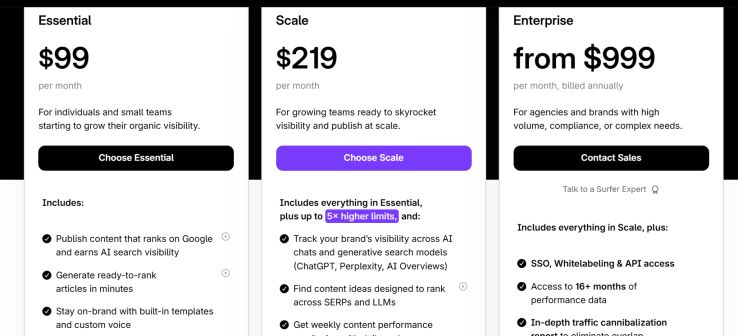
Surfer has three main pricing plans, which are
Essential: Costs $99 per month and $79 when billed annually.
It comes with features that allow you to publish content, generate ready-to-use content, integrate with Google Docs, collaborate with a team, etc.
Scale: The scale costs $219 per month and $175 when billed annually. It includes everything in Essential, plus tracking brand visibility, access to AI chat, finding content ideas, access to weekly performance, exporting data, and more.
Enterprises cost $999 per month. It’s perfect for agencies and brands.It includes everything in the scale, plus white labelling, API access, 10 months of data, priority support, traffic reports, and much more.
Pros and Cons
Let’s look at some benefits of using Surfer and its drawbacks, since there is no tool that satisfies users 100%.
Pros
- The content optimization feature is outstanding and works excellently. If you’re looking for a tool to better optimize all your content, Surfer is the go-to.
- Surfer integrates with third-party tools like WordPress, Google Docs, and more.
- If you want your brand to be mentioned on Google AI overviews, AI engines like ChatGPT, Perplexity, and many more, Surfer can make it possible.
- Detect AI content and ensure your content is free from errors with the Surfer plagiarism tool.
Cons
As Surfer offers more benefits for its users, there are some drawbacks.
- Expensive: The lowest plan is $99 per month; it may be too costly for beginners.
- Requires a basic understanding of SEO: To fully make use of all its features, you may need to learn about SEO and some terms to guide you.
- Only focuses on content optimization, no built-in keyword research tool.
Surfer Rating and Review
It has good ratings and reviews.
If you’re looking for the best SEO tool for audits and content optimization, then Surfer fits your needs.
What’s working: When using Surfer SEO to generate content, always cross-check, as no AI is 100% accurate. My advice is to stay away from publishing AI content directly without a human touch.
6. SE Ranking
SEO audit
Ease of use: Beginners and intermediate
Best for: SEO agencies and teams
Pricing: Starts at $52 per month
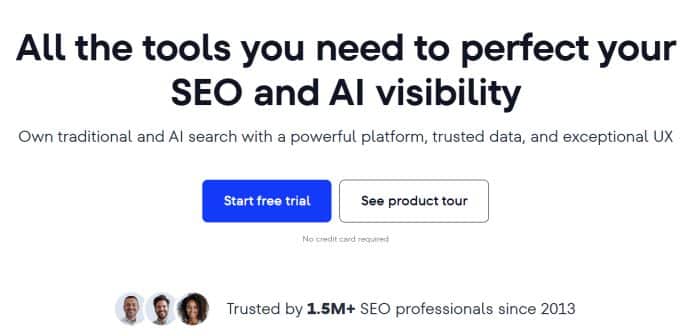
SE Ranking is a tool perfect for SEO and AI visibility, and it seems that the platform leverages more AI features to solve SEO problems people are facing.
One thing I like about the SE Ranking tool is that it has more features that cater to traditional and local SEO.
How SE Ranking Works
SE Ranking is built for both beginners and those experienced in SEO. It provides all the tools needed to outrank competitors.
Keyword Rank Tracker
Track all your pages and find out how they’re ranked for target keywords. It makes it easy to track keywords in any location with 90% accuracy.
Spy on your competitors’ keyword ranking and how you can outrank them. Not only that, users can analyse the top 100 search results for any keywords.
Perform Keyword Research
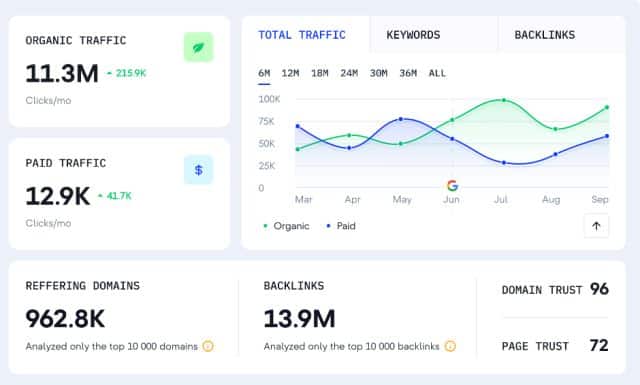
Quickly perform keyword research to identify new keywords, a list of low-competition keywords, and uncover related keywords to optimize your content.
I like the way SE Ranking identifies all keywords my competitors are targeting in both organic and paid search.
I can analyse any keywords and target relevant search queries.
It offers tools to perform in-depth keyword research and drive more traffic to your site.
Backlink Checker
If you want to rank high in search engines, you need to build quality backlinks to your pages.
SE Ranking has a built-in backlink checker to check the backlinks of your competitors’ websites.
It will provide you with all the websites that link to your competitors’ websites and analyze the referring domains, anchor text, and linking pages.
Then measure the value of any backlinks to know if they are worth it or not.
Backlink Monitor
As you’re building a backlink profile, you can also monitor it to ensure quality backlinks to your pages.
Identify any bad links, and use the backlink monitor to disavow. No manual work; it can be done with just a click.
You can also use this tool to manage new and lost backlinks and measure the ratio.
Competitor Analysis tool
Analyze your competitor’s website traffic and organic and paid campaigns. Not only that, but access to the list of competitors’ target search queries and analysis of them.
The competitor tool lets you spy on their PPC campaigns and see which keywords they target.
There is more you can do with this tool.
Website Audit tool
Audit your website or your client’s website in a matter of minutes.
Identify what needs to improve and how to fix SEO issues and boost your search engine ranking
On-Page Checker
This feature helps to check your on-page SEO, especially for a beginner.
You can identify and fix your on-page SEO issues without wasting much time.
Content Editor
The content editor is to optimise content for SEO. This helps to know which keywords to include in the content, fix any errors, compare your results with the top 10, etc.
Who Is SE Ranking for?
The SE Ranking is designed for SEO agencies, freelancers, and marketing teams managing clients’ websites.
The platform also works better for local SEO agencies.
Pricing Plans
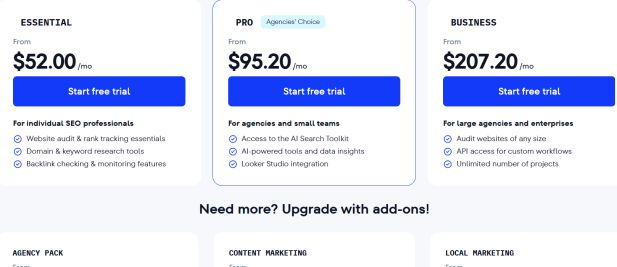
SE Ranking has three pricing plans:
Essential: It costs $52 per month and is perfect for individuals. It comes with a keyword research tool, website audit, backlinks checking, etc
Pro: It costs $95.20 per month. Great for agencies and teams. It comes with access to the entire SEO toolkit, an AI-powered tool, and data insights.
Business: It costs $207.20 per month. It’s perfect for large agencies with unlimited projects and much more.
Pros and Cons
- Great for local marketing and SEO agencies
- Tracking in multiple locations
- Great support team
- Offer AI insights
- Boost Al visibility
Cons
- Reporting may be basic compared to other tools.
- May not offer advanced features like the Semrush and Keysearch tools
SE Ranking rating and Review
It has about 4.8 out of 5 stars on G2, while it has 4.7 stars on Trustpilot.
7. Mangools Keyword Tool
SEO tools for beginners

Category: All-in-one
Best for: Beginners
If you’re a beginner in SEO and want an easy-to-use tool, then Mangools’ keyword research and SEO tool may be a better option.
I have used the free version of the Mangools tool, and I can say it is one of the best tools out there to perform keyword research, AI search and increase site visibility and gain more traffic.
How It Works
Let’s take a look at its features if you prefer to use the Mangools SEO software.
The KWfinder is very easy to use for keyword research and discovering link tail keywords with low SEO difficulty.
I have used it several times to uncover new keywords and related keywords with low competition.
I can also add a domain and see all the keywords it ranks for. This is an opportunity for me to spy on my competitors’ keywords.
When performing keyword research, you will discover new keyword ideas, keyword difficulties, search volume, etc.
The SERP analysis tool dives deep into search results, analyses top-ranking websites and other metrics, so you can compare your page with them to better understand your chance to outrank them.
Track your SEO results, and even share reports with your clients. Identify keywords that are gaining and losing ranking.
The backlink checker tool helps to build quality backlinks. Analyse competitors’ backlinks and replicate the best of them. Not only that, you can find their anchor text, so you can come up with effective backlink strategies to outrank them.
What I like about the tool is that I can live preview for link placement, save link opportunities for later, plus advanced filtering.
With Mongools’ site explorer, I can quickly study my competitors’ websites to identify all their metrics such as domain authority, backlink profiles, popular content, keywords that are driving the highest traffic and other insights.
Use the AI search feature to ensure your website is visible to all AI engines such as ChatGPT, Perplexity and other AI tools.
Who Is Mongools for?
It’s a great tool designed for beginners to advanced users who want to uncover new keywords, find low competition keywords, and help their website become visible to AI engines.
Pricing Plans
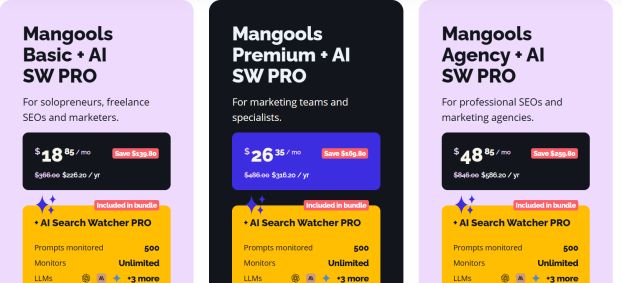
There are 3 pricing plans, which are:
Mongool’s Basic: It costs $18 per month, and it comes with 500 prompt monitors, 100 keyword research, SERP analysis, rank tracking, etc
Mongols Premium: Costs $26 per month. It comes with AI Search Watcher Pro, 500 prompts, keyword research, 500 SERP analyses, etc
Mongools Agency: costs $49 per month, with AI Search Watcher Pro, $1.2k keyword research, 1.2k SERP analyses, rank tracking, and much more.
Pros and Cons
Despite all its amazing features, the Mongools tool still has a few drawbacks that I need to mention.
Pros
- Easy to use and user-friendly interface
- Affordable compared to some keyword software like SemRush and Ahrefs
- Easy to set up with a little learning curve
Cons
- The lower tiers have limitations
- Not comprehensive enough to provide advanced metrics for an SEO professional.
- Overall Mongools SEO tool is among the best keyword research software in the market for beginners.
- It is very affordable, and you can start with the free plan to test its features.
8. AnswerTheRepublic
Keyword research and question-related queries.
Best for: Question-related keywords
Ease of use: Beginners
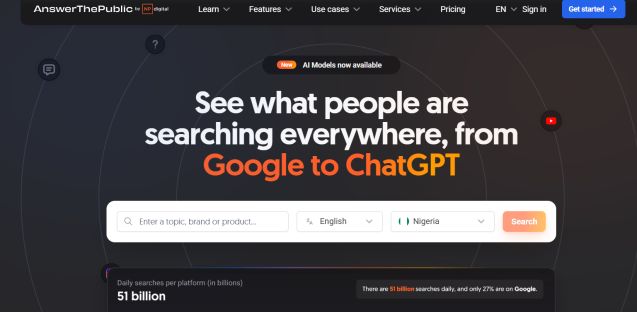
AnswerTheRepublic is the best question-related keyword tool, and it has been around for years.
A few years ago, the man behind Ubersuggest, Neil Patel, and NP Digital acquired AnswerTheRepublic.
With this tool in hand, you can find question-related keywords with their metrics to get more visibility and drive traffic to your website.
The new upgrade added more features that make it stand out.
From searching keywords related to what people are searching for on AI to uncovering raw search insights.
How It Works
When you enter a search query into the tool and click search. You will get an overview of related question keywords to the search query, volume, and CPC.
The ATP answers queries with dynamic visualizations based on the questions.
I like how the tool arranges its results, and all the keywords are always long-tail with low competition that can easily rank on search engines.
The inclusion of an AI prompt makes the tool fit for anyone in the SEO world.
Another thing I like is the social media feature. It reveals what people are searching for on YouTube, TikTok, and Instagram
Pros and Cons
Pros
- User-friendly interface
- Provides keyword metrics
- Find new related question keywords
- Easy to uncover low-competition keywords
- Very affordable
Cons
- Not a complete SEO tool
- Not providing comprehensive metrics
9. Google Search Console
Best-performing search engine tool
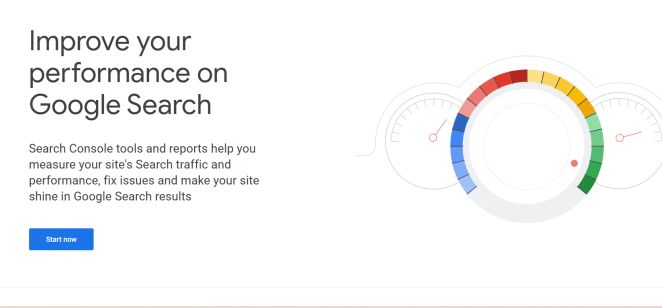
Google Search Console is a free SEO tool that can provide data and insight to help improve your search visibility and ranking.
It is a free tool for website owners to monitor and troubleshoot their site in Google to provide insight on the following:
Performance such as clicks, impressions, and ranking.
Fix technical issues and errors like security problems, indexing issues, etc.
Core Web Vitals and how to improve the visibility of a website through data provided by Google.
The GSC is very crucial for SEO by offering reports on search queries, indexing status, and mobile usability, which help webmasters understand how their websites are performing on Google to boost traffic.
Key Features
Monitoring Site Performance
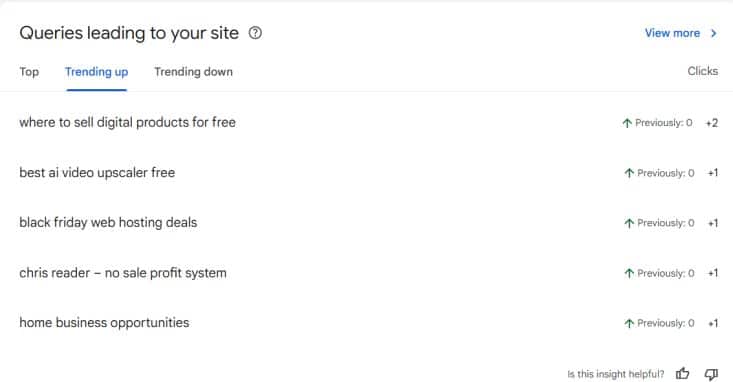
See how your website performs in search results by providing data such as clicks, impressions, CTR, average position, and queries users search for.
Indexing & Crawling
Your website can’t appear on Google without being indexed and crawled.
You submit your site’s sitemaps, check index coverage, find crawl errors (like 404s), and request indexing when you publish new pages.
Site Health & Issues
Discover if there are any security issues, manual penalties, and mobile problems through alerts and notifications.
I receive a notification when my site has an indexing issue or finds 404 pages.
User Experience
Understand user experience through core web vitals.
The Core Web Vitals provide insights into page speed and visual stability to improve user experience.
It is essential to know that any site must pass Core Web Vitals, as Google requires.
Content Optimization
This feature provides data and insights to help you optimise your content and boost your ranking.
I used these features to identify ranking opportunities, as they provide keywords that are getting clicks, impressions, and more.
It helps to fix issues affecting visibility and understand how Google sees your content.
Most of the data provided in Google Search Console are more accurate compared to other SEO tools in the market.
How GSC Works
Add Your Website: Sign in to your GSC account and add your website as a property.
Verify Site Ownership: It is crucial to prove you’re the owner of the site.
You can do that by adding a DNS record or using Google Analytics.
Many bloggers use SEO plugins such as RankMath, Yoast, etc., to optimize their websites.
Access Data: After verifying your site, you get access to reports and tools to analyze the organic search data of your site.
The Google Search Console provides more accurate data and insights to help anyone boost their site ranking and search engine visibility.
Who Uses It
The GSC is best for site owners, SEO professionals, and marketers.
Adding your site to GSC helps you get data and insights to ensure it is indexed, performs well, and offers a better user experience on Google Search.
10. Google Keyword Planner
Best keyword and topic research tool
Best for: Beginners and experienced
Ease of use: Not beginner-friendly
Pricing: Free
The next SEO tool on this list is Google Keyword Planner, owned by Google.
It goes beyond just keyword research; it is combined with marketing insight, such as Google ads, CPC, search volume, etc.
I do use the tool for keyword research and get more in-depth data that is more accurate, such as search volume, long-tail keywords, CPC, low and highly competitive keywords, and much more.
Google Keyword tool
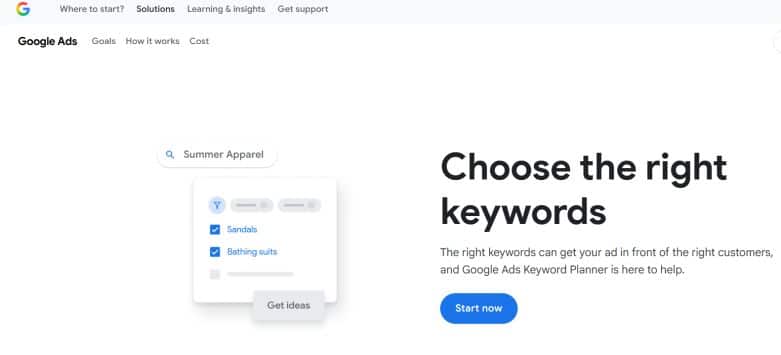
The Google Keyword Planner is a free tool that helps marketers find relevant keywords, get search volume estimates, and discover new keyword ideas for SEO strategies through search queries.
Help Discover New Keywords
Find new keyword ideas related to your topic and websites by entering a seed keyword into the tool.
This is where GKP performs better; it can discover new related keywords you can’t find in another SEO tool.
Better search insights
Unlike other keyword research tools, the GKP provides more accurate search volume insights than other tools in the market.
You can see the monthly search volume for potential traffic.
Performance
Since GKP works together with Ads data and insights, you can get an estimate on how your keyword will perform in an ad campaign.
Filter Keywords
You can filter keywords by location, language, brand names, etc., to focus more on a specific audience.
I use the tool most for keyword research and discover the volume and find out if the keywords have low or high competition for easy ranking.
Who to use GKP
Anyone can use the tool, whether you’re a beginner or an expert.
It doesn’t have as many features as other tools, but it can provide more accurate data. Since it is free, you can use it however you like without limit.
Pros and Cons
Pros
- It is owned by Google, so data and insight can be more accurate in terms of search volume, CPC, competitiveness, etc.
- Free to use with no limit
Cons
- It is not a complete SEO tool; it lacks some features that are essential for SEO professionals.
- It can be overwhelming when performing keyword research, as it combines keywords and ad insights and data.
GKP rating and review
GKP still gets some great ratings and reviews. 4.7 start of 5 on G2
11. Google Autocomplete
Best Search intent discovery tool
Ease of use: Beginners
Pricing: Free
You probably have heard about Google Autocomplete if you’re not new in the SEO world.
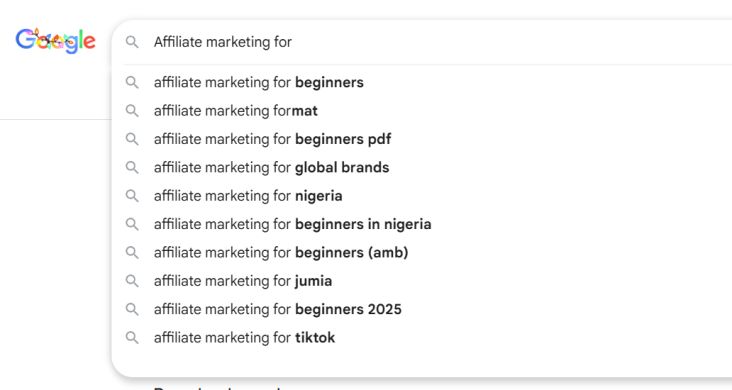
It is also known as auto-suggest. This tool provides easy-to-rank, low-competition keywords that have no metrics.
I have used this tool to find low-hanging keywords that other keyword tools cannot find, as they have no search volume, which means zero-volume keywords.
But they drive targeted traffic that can convert or generate sales.
How It Works
Go to Google.com, and type in your seed keyword into the search bar. Make sure to open it in a new window.
For example, make money online. Google will display or suggest other related search keywords.
Most of the Google auto-suggest keywords have zero search volume, but they can drive hundreds to thousands of traffic to your site.
They’re very easy to rank due to low competition.
Who is the tool for?
For beginners who want to get traffic to their new blog. Many experienced SEO experts ignore this type of keyword because of low or no search volume.
If you’re a beginner, you can try it, and you will be amazed by the results you can get.
Pros and Cons
Pros
- Easy to rank on search engines
- Very low competition
- They’re long-tail keywords
- Drive targeted traffic.
Cons
Low search volume
12. Bing Webmaster Tool
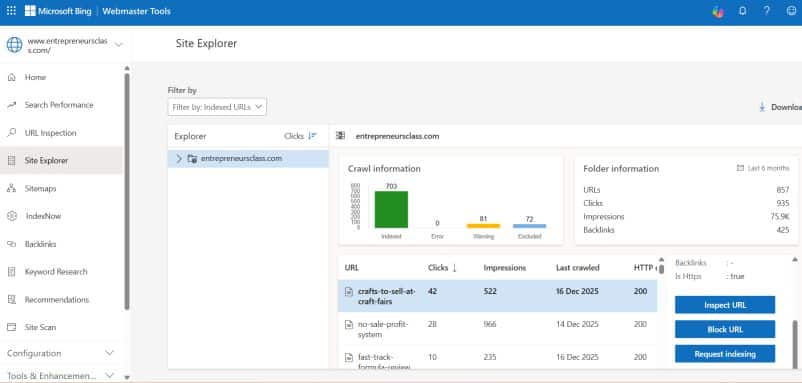
Bing Webmaster Tools is a free platform that allows site owners to monitor and improve their site visibility and performance in Bing search results.
Just like Google Search Console, it offers a tool for checking website health for issues on SEO.
I use its keyword research tool to uncover related keywords, manage backlinks, etc
You can submit URLs for indexing, analyse search traffic (clicks, impressions), check site health for SEO issues, conduct keyword research, monitor backlinks, etc.
I submit my page to BWT anytime I publish a new article for quick indexing.
One thing I like about the BWT tool is URL inspection. Provide data that shows if my published page is available on Bing.
The indexNow feature provides all the URLs of your website that is indexed on BWT.
BWT helps to manage your site and ensure it finds and ranks your content.
Key Features
Monitor Site Performance: Understand how your site performs in Bing search by showing data on clicks, impressions, click-through rates, and average position of keywords.
URL Submission & Indexing: You can submit individual URLs to Bing and get your pages indexed faster.
You also need to submit the sitemaps for Bing to crawl all your pages.
When you publish a new blog post, add it to the Bing tool to index it.
Crawl Diagnostics: It diagnoses your site to identify technical SEO issues like 404 errors, blocked content, or slow pages. This will help you to fix them and improve your performance and boost ranking.
Keyword Research: I use the Bing keyword tool to uncover new keywords for my content strategy.
Though I don’t rely on it much, I still get some traffic from Bing, but it can’t be compared to Google.
Backlink Analysis: Discover referring domains of your website and compare it with your competitors. It also shows the referring domains to your site pages and their anchor text.
Why use it?
You can attract more traffic from people who search on Bing. Get data on how Bing sees your site to help you optimize and fix technical errors and on-page elements.
13. Screaming Frog SEO Spider
Best SEO Audit tool
Best for: experienced SEO
Ease of use; Experts and professionals
The Screaming Frog SEO Spider leading website crawler for Windows, macOS and Linux, used by thousands of SEOs and agencies for technical SEO site audits.
If you’re looking for the best SEO software to help you improve onsite SEO by auditing common issues, then try the Screaming Frog tool.
You can crawl up to 500 URLs for free or subscribe to a paid plan to unlock more features.
How It Works
One of the core features of Screaming Frog SEO Spider is to find broken links and server errors.
Then get bulk experts to fix all the issues.
Another important feature of the tool is to audit redirects.
You can analyze page titles and meta descriptions, then identify those that are too long, too short, missing or duplicated on your website.
These issues can have negative effects on your website’s SEO and ranking.
If you publish content often, you can simply discover duplicate content.
Not only that, you can generate XML sitemaps and image XML sitemaps for websites that are not created using a CMS.
To get more insights for SEO and optimization, you can connect Screaming Frog SEO Spider with Google Analytics, Search Engine Console, and Page Speed APIs.
Great for scheduling audits. Many users prefer to use the SEO tool for complex tasks such as scheduling crawls to run at chosen intervals and auto-exporting crawl data.
There is more you can do with the Screaming Frog SEO tool, but not recommend it for beginners.
You will need to download the software and create an account before you can use it.
You can start for free and upgrade to the paid plan later.
Pricing
- Free plan
- Paid: cost $249 per year
14. Similarweb
Great for website analysis
Best for: Analysing competitors’ websites
Pricing: Free and paid plans. It starts at $1,300 per year.
Similarweb has been in existence for years as one of the best marketing insights tools I have used to analyse website traffic.
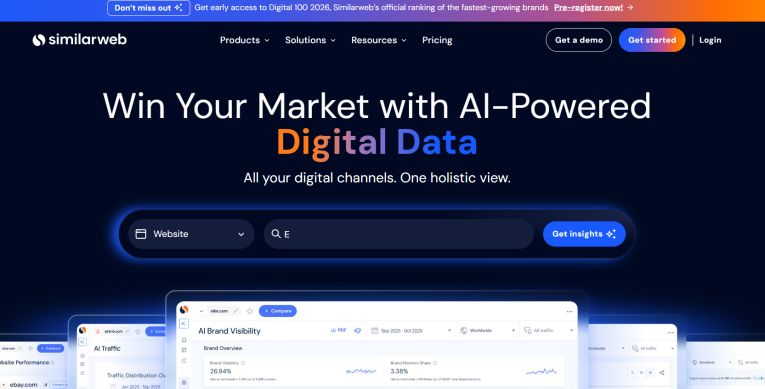
Similarweb is not a complete SEO tool, but it works better to win the market with AI-powered digital data.
It is a marketing tool to boost your brand visibility in Gen AI and see what your customers are searching for on AI search.
The platform has been upgraded with more advanced features, and now it competes with the rest of the marketing and SEO tools.
According to Similarweb, it can reveal your competitors’ marketing strategies so that you can see what is working and driving their business forward.
Perform competitor analysis, keyword research, PPC insight, and ad intelligence.
Offer an SEO toolkit to gain more organic traffic with data insights and an easy-to-use SEO tool.
Find out which keywords drive the most traffic, and optimize for new searches.
The tool helps you to predict how trends impact organic traffic, so you can prepare ahead of time.
In addition, you can access full SERP data and ad data of your competitors. Offer you opportunities for the best strategies to improve your SEO and ROI in your ad spending.
I used Similarweb to find out which keywords my competitors are bidding on and which countries are sending the most traffic.
The tool is not only for SEO; it offers marketing insights to know how your competitors are performing.
It calls itself the #1 web intelligence solution to monitor your competitors’ performance with actionable insights.
Another feature I love to use is the market research tool. Analyze market trends, understand market size and track everything.
It is a great tool to win in this competitive market.
Pricing
It has three pricing plans:
Competitive Intelligence costs $125 per month.
Competitive Intelligence & SEO costs $335 per month
Competitive Intelligence SEO & Ads costs $540 per month.
The platform has a good rating and reviews, which means most of its users are satisfied with the tool
15. Keyword Everywhere
Chrome tool for keyword research
Best for: Beginners
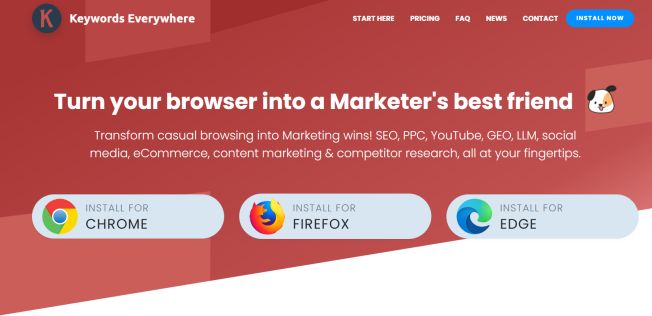
Keyword Everywhere is a Chrome browser extension to transform the browser into a marketing win for SEO, PPC, YouTube, LLM, and social media.
One main advantage of Keyword Everywhere is that you can simply install and start using it.
It has helped many marketers to grow their online presence with the SEO toolbox.
Keyword Everywhere is available for Chrome, Firefox, and Edge.
The tool is upgraded with more features and integrates with over 15 powerful tools.
Who Is Keyword Everywhere For?
This tool is perfect for anyone—bloggers, marketers—doing keyword research and wanting access to data and insights of their competitors.
If you’re an SEO and content creator, you will love this Chrome tool to quickly get insights from your research using Google, Firefox, or Edge browsers.
Pricing Plans
The tool has three pricing plans:
Bronze: It costs $7 per month and $84 billed annually.
Silver: $14 per month and $168 per year
Gold: It costs $40 per month and $480 when billed annually.
Platinum: It costs $120 per month and $1440 when billed annually.
16. ClearScope
Best SEO tool for content optimisation
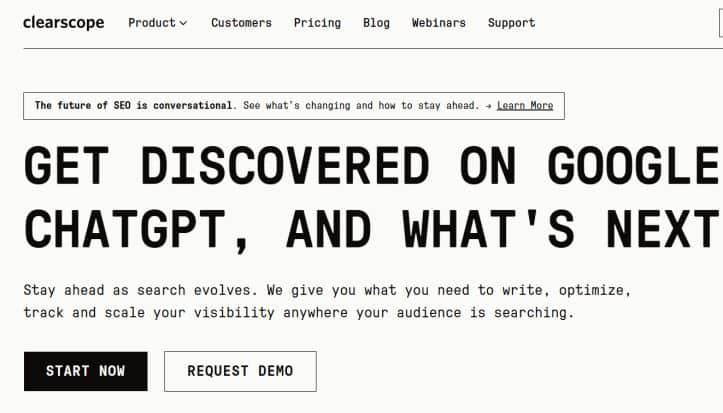
Another great SEO tool that you may need to check is ClearScope. Although the tool is not as popular as Semrush, Keysearch, and some other keyword research software.
Just like the Surfer tool, ClearScope performs better for content optimization.
The platform offers you tools to write, optimize, track, and analyze your website visibility.
I like the way ClearScope makes it easy to create and scale content with an AI assistant.
You don’t need to waste hours editing your content and optimizing it; AI does all the hard work for you.
After publishing the content, just monitor and improve it to boost it ranking and drive more traffic.
Track your website visibility and ranking across Google and AI chatbots
The ClearScope keyword research tool reveals what your audience is searching for, finds new keywords and question-related keywords, and helps you rank first on search engines.
Pricing Plans
ClearScope has three pricing plans, which are:
Essential: It costs $129 per month
Business: It costs $399 per month
Custom plan: Requires contacting customer support.
ClearScope SEO software offers features needed for beginners and experienced SEOs to optimize content and boost their website visibility in search engines and AI chatbots.
17. SEOptmer
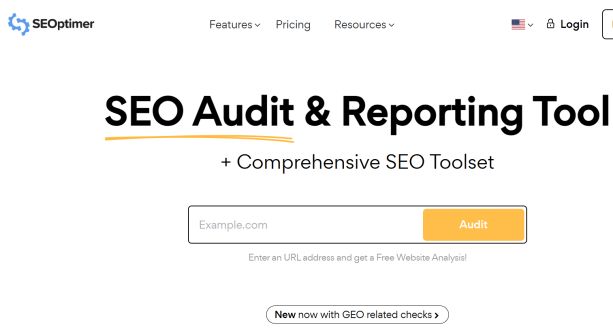
SEO audit and Reporting tool
SEOptimer is not new, and many bloggers, agencies, and marketers are using it to increase their website visibility and drive more traffic.
According to the platform, it was created for small business owners and digital agencies.
So, if you’re an SEO expert, blogger, or web designer who wants to improve your website on Google and boost traffic, you may want to check out the SEOptimer tool.
How It Works
One of the core features of the software is SEO audits.
SEOptimer is a website SEO checker that analyzes your website or clients’ sites and identifies issues preventing them from ranking higher on search engines.
It provides all the reports in PDF so you can download it to fix any problems.
Another feature is the SEO crawler. It will crawl your site and identify on-page SEO issues, set custom URL crawling, etc.
It can review every page of a website and provide a simple report to identify problems.
The keyword research tool is perfect for finding new keywords with their metrics such as monthly search volume, traffic, and CPC.
I can use the SEOptimer keyword tool to uncover new keyword opportunities with low competition.
Show you the keyword difficulty, and you can know which ones are easy to rank on Google and other search engines.
Another thing I like about the tool is that it loads the SERP so that I can inspect the first-page SERP for any keyword in any country.
You can track how your pages are performing using its tracking tool. You can track your page by country, language, and by search engines.
The backlink research and monitoring help you to spy on your competitor’s backlink profile.
Any time I want to build a link to my blog, I prefer to do backlink analyses of my competitors’ websites to find out where they’re getting quality links to their sites.
Access to the bulk report is another benefit of using the SEOptimer tool. You can also use its API, but it depends on your plan.
The localRanking tool and AI SEO writing are game-changers for both professional and local SEO to improve and optimize their content for better ranking.
Pricing Plans
The SEOptmer has three pricing plans, which are
DIY SEO: It costs $29 per month.
White Label: It costs $39 per month, and it is ideal for marketers.
White Label and Embedding: It costs $59 per month and is perfect for agencies.
Overall, the SEOptimer is a great SEO software that is ideal for bloggers and agencies.
18. Google Analytics 4
Google Analytics 4 has improved greatly, and you can use it to get more insights and improve your site’s visibility on search engines.
Google Analytics 4 (GA4) is an event-based analytics platform from Google to track user behavior across websites and apps in a unified way.
GA4 focuses on the customer journey and uses AI to provide insights for better marketing optimisation and provides insights on clicks, scrolls, purchases, etc
Conclusion
Choosing the best SEO tool in 2026 depends on your needs. Whether it’s content optimization, keyword research, or technical SEO, software like Semrush, Ahrefs, Ubersuggest, and Keysearch are among industry leaders.
Other new platforms like Mongools, SurferSEO, and Clearscope are getting more attention for their specialized features.
Some of these SEO tools can help you develop an SEO strategy tailored to your goals.
Here is the list of the best SEO tools for the year 2026 that you can use to grow your site traffic and optimize for search engines.
Is SEO still worth it?
SEO is worth it in 2026, but you need to change the way you approach it compared to a few years back.
Google’s algorithm is changing, and we need to follow along.
Create content that helps your audience and not just for search engines.
SEO is worth your time and investment to get results and get ROI.
If you want to win at SEO in 2026, it doesn’t depend on the tool you use but on the ability to create quality content that resonates with your audience.
In your content, share your experience, expertise, and knowledge you have to ensure you solve your audience’s problem.
You can read my latest blog post on the best SEO automation tools that you can use to automate most of your SEO tasks.
To complement your SEO efforts, you can include some of the best AI marketing tools to automate most of your business or SEO tasks.
Related Posts
- What Is The Idea Blog Post Title Length for SEO
- How Long Should a Blog Post Be for SEO
- 8 Places To Add SEO Keywords On Your Website Pages
- How Many Keywords Should I Use for SEO?
