
Welcome to my GeneratePress theme review. This is an honest review based on my experience as a user.
Are you interested in using the GeneratePress theme for your WordPress site?
We provide details about the GeneratePress review to help you decide if it is the best option for your blog.
I use the GeneratePress theme for all my sites, including the one you’re reading now, and I have never regretted it.
I also have experience with the GeneratePress theme, which I want to share.
Here is the proof of my GeneratePress purchase history.

My goal is to help you choose the best theme for your site, either the GeneratePress or its best alternatives, to give you the best results you desire in your blogging journey.
Here is what I’m going to cover
Table of Contents
- GeneratePress Theme Review: Overview
- GeneratePress Theme Pros and Cons
- Features
- GeneratePress Theme Price
- My Experience with the GeneratePress Theme
- GeneratePress Theme Review: Final Thoughts
- GeneratePress Theme Alternatives
GeneratePress Theme Review: Overview
GeneratePress is one of the best lightweight WordPress themes for bloggers due to its fast speed and performance.
It offers many features to design an attractive blog or website without coding experience.
The theme has free and premium versions, but the free version has limited features and capabilities.
The main core features of the GeneratePress theme are fast loading and lightweight, so it doesn’t slow down your site loading and speed, which can improve the SEO of blog pages.

Editor Rating
Overall rating: 3.9/5
GeneratePress Theme focuses on speed and fast loading to improve the site’s SEO. However, the theme is not without some drawbacks, and it needs improvement.
The ease of use and the theme customisation can be improved for beginners.
GeneratePress Theme Pros and Cons
Let’s look at some of the pros and cons of the theme.
Pros
- GeneratePress focuses on speed
- Lightweight WordPress theme
- Work for any WordPress site
- One of the best fast-loading themes
- Documentation
- Affordable
- Customisable options
- Work with any page builder plugins
- Excellent support with an engaging forum
- Easy to import demo sites
- Regular Updating
Cons
- The free version does not come with the demo site
- Limited integration compared to other themes
- It does not work with most LMS plugins
- Limited advanced features compared to other themes
- No set-up wizard
Ease of Use
GeneratePress is very easy to use on any website or blog, and I would rate it as 3.8/5.
GeneratePress uses a modular approach, which allows users to activate features they like or want to use.
User can easily click and activate modules from their dashboard.
But there is no setup wizard, which is the main drawback of the theme if you’re a beginner.
Installation process
The GeneratePress installation seems different from other themes, as you need to install the free theme version and then but the GeneratePress Pro plugin to get all the functionality.
To install the theme from the dashboard:

Go to Appearance>Theme > Add New
From the search bar, search for the GeneratePress theme
Install and activate the theme, that is it.
That is the free version. To get the pro version, you will need to purchase the premium GeneratePress plugin and install it.
After purchasing the premium plugin, then to the dashboard
Go to plugin > add new plugin > upload plugin

From your file, locate the plugin and select it
Click on Install to upload the plugin.
Now that you have installed the GeneratePress premium plugin, you must find the license key from your account.
They will provide a license key to activate the premium plugin and access all the functionality and features.
From your GP account:
Find your license key and copy it
Go to Appearance and click on GeneratePress
Enter the GP license key you copied from the GP account
And click save; that is it.

Theme Set Up
Now that everything is set, it is time to set up your theme and see all the features you can customise.
Unfortunately, GeneratePress has no setup wizard to walk you through all the settings.
NOTE: GP means GeneratePress
To activate all the modules, go to Appearance and click on GP; see the image below.

Then, activate all the modules except WooCommerce. You will need to install the WooCommerce plugin to make the module work.
As you can see from the image, I activated all the modules except of the WooCommerce module.If you want to use all the modules, make sure to click on them and activate them.
Features
Now that you have learned how to install and set up the GP theme.
Let’s look at its features.
For the GP features, I can rate it 4/5
When I bought the theme, I didn’t even worry about looking for the tutorial on customising it.
Very simple and easy to customise to fit your needs.
Live Customizer Options
I love the live customiser options; as I’m customising the theme, I can see the preview and how it looks like.

The theme allows me to customise the following:
- Layout
- Text
- Topography
- Background
- Colours
All these are very easy to customise. You can customise the container, header, primary and secondary navigation, slides, blog layout, footer, etc.
The blog layout allows me to customise the blog, including media, content type, and feature image. I can decide to show the media or hide them.
For the background and colour, I was amazed at how simple it is to change the colour of the background, header, footer and all the navigation.
You can change to any colour that fits your brand with the GeneratePress theme.
Topography: This is where you change the font of the text. There are many fonts you can choose from, depending on what you like.
I prefer to limit the front text setting to keep the theme file lower and not affect the blog’s speed.
Element (Theme Builder)
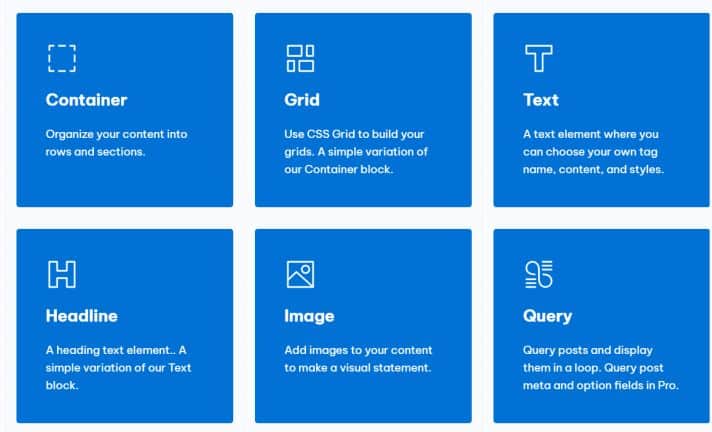
The GeneratePress theme builder block allows anyone to use the WordPress block editor to create side headers, hooks, site footers, etc.
I am not a fan of this feature as it seems complicated.
When I wanted to use the element features to build a single page, GP asked me to install their GenerateBlocks plugin.
The plugin has a pro version, which requires $39 per year to access all the features and patterns.
The GP element can help many users and bloggers who want to build a page using a page builder.
Pre-design Templates
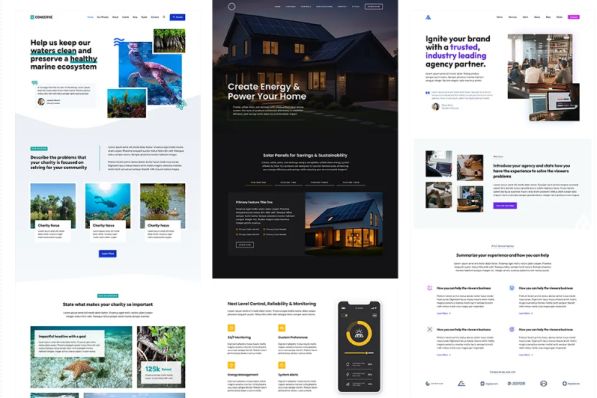
Another thing I love about the GeneratePress theme is the extensive library of professionally designed starter site templates to start your new site with no coding experience.
Just pick the template that you love most, then easily switch out the content and images to make it your own. The process saves you hours of time redesigning your blog or website!
Demo sites
All WordPress themes have demo sites, making it easy for new users to set up blogs and create beautiful sites.
The GP demo sites are amazing, with many templates to choose from.
When I just bought the GeneratePress theme, I played around to familiarise myself with its features. When I saw the DEMO sites, I understood why many authors and bloggers love the GeneratePress theme.
To locate the demo sites, go to Appearance, then GP, and click on Library.
There are many demos you can choose from, depending on what you want. It has different site designs that you need as an author or blogger.
The sites have three categories as follows:
- Business
- eCommerce
- Blog
To use the demo site for your blog, click on any of your choice and follow the instructions.
NOTE: The GeberatePress demo sites may not work well on existing sites. It is advisable to install it on a new blog or site.
My thought
The demo sites are one of the main features of the GP theme. With many stunning designs, you can build a good-looking site in a matter of time.
You will still need to customise most of these demo sites to make everything work and look how you want it.
Reliability
Is the GP reliable?
Yes, and my rating for the theme is 4.5/5
The GP theme has existed for years, and they are updating it to meet market demand.
The GeneratePress theme has a proven record of excellent performance, including 100% page loading speed and a weight of just 7.5KB.
The GP is the lightest theme, making sites load fast without heavy theme files.
GP regularly update to the latest WordPress version.
Although the theme has fewer features than other WordPress themes, it is still among the top-rated themes for WordPress sites.
GP Performance
The GP theme has an outstanding performance, and the team also use this as a point of sale, telling people about the 100 per cent page speed.
For a theme with just 7.5GB size (free theme version) compare it to other themes.
It is an excellent theme for optimisation to help in terms of SEO. The GP performance for loading time and page size gives the site a speed and user experience.
Below are some of the results performance of sites using the GP theme
Support and customer services
The GP support has been great, meaning anytime I need help, I can quickly contact the team, and they respond on time.
There are many ways to reach them; you can mail them or post your question on their forum to get it answered in a few minutes.
Another thing I like about GP is that they provide a complete document to help their users understand how the theme works and the setup instructions.
Here is what they provided to guide users.
- Generate a support forum
- Contact form
- Document
The main drawback of their support is the lack of phone calls. Many people may not be too concerned about this; some may feel that phone calls are crucial for a fast response.
GeneratePress Theme Price

Now that you understand what GP theme offers, let’s talk about the price.
The Free Theme
The GeneratePress theme is free for everyone, and you can access it using WordPress theme.
Premium
The GeneratePress theme has two payment plans. The GeneratePress premium price is $59 per year, while the GeneratePress One is $149 yearly.
You can install up to 500 sites for both plans, but GP gives more advanced features.
If you’re just starting, I advise you to go for the $59 per month plan and upgrade later if you want to use all the advanced features for your site.
Visit the official page to choose your plan
Refund/Money Back
GeneratePress offers a 30-day money-back guarantee if you’re not satisfied with the theme.
With their refund policy, you have nothing to lose. You can use the contact form to ask them for a refund, and they will reply within 24 hours.
My Experience with the GeneratePress Theme
When I was looking for a new theme for my site, I asked many groups where there were some bloggers.
And to my surprise, 50% of people recommend the GP theme. There are some other themes, such as the Astra and Kadence themes.
So I decided to go for the GP then.
I bought GeneratePress and installed it on my blog. It looks great, and I am happy with its ease of use and simple customisation.
Another thing I like about the GeneratePress theme is that you can turn off the content Title of your post. This works better for an affiliate who wants to create a single page with the product image and description.
Many Clickbank affiliates use GP to create and promote a product page using paid ads.
There are more advantages to using the GP theme for your sites. I use the theme for all my sites, which is worth it.
GeneratePress Theme Review: Final Thoughts
GeneratePress beats other themes in performance, is fast-loading, is user-friendly, and has excellent support.
And despite all its performance, there is room for improvement, especially since the free version needs more features.
You can find many testimonies of the GP online, and the rating is over 4 out of 5 stars.
I have been using the GeneratePress theme and plugin. You can also join me and build a response site for your brand.
If you are new to blogging, you can check my post on Best Hosting for bloggers, so you can choose the best web hosting to work seamlessly with your theme.
GeneratePress Theme Alternatives
there are may other WordPress themes available online today that claim to be the best.Below are a few of the best theme you may want to check,if you’re looking for better alternative to GeneratePress theme.
Astra Theme: Astra is another lightweight WordPress theme used by thousads of proffessiona ploggers.Easy to customise with many advanced features that can make your blog responsive on mobile device.
Kadence: Another theme you may want to check is Kadence.I love this theme due to its ease of customisation.If you’re in need of a new theme for your blog,you may want to try Kadence theme.
Related Posts
- What Is Product Launch Formula And How it works
- Clickfunnels 2.0 Pricing
- What Are The Best Sales Funnel Builders
- 40 Amazon Seller Statistics
- Digital Marketing Strategies for New Product Launch
